2025-11-24
算法
00

目录

1️⃣三种基本变换:平移、旋转和缩放
平移与齐次坐标
2️⃣ 矩阵变换实际应用
局部空间到世界空间
局部空间到观察空间
1. 场景设定与直观理解
设定
直观理解:相对运动
2. 构建相机的“基向量”(UVN系统)
3. 矩阵推导:平移与旋转
第一步:平移矩阵 $T$
第二步:旋转矩阵 $R$(核心应用!)
4. 最终的视图矩阵 (View Matrix)
5. 总结与举例验证
关键点回顾
3️⃣FPS相机与轨道相机

本文将简述常见的空间变换矩阵和相关公式推导。

1️⃣三种基本变换:平移、旋转和缩放

我们先尝试只用3x3矩阵来表示这些变换。这种方式很容易让人接受【但计算机没那么喜欢】

  • 缩放(Scale): 可以完美地用3x3矩阵表示。
[Sx000Sy000Sz][xyz]=[SxxSyySzz]\left[ \begin{matrix} {S_{x}} & {0} & {0} \\ {0} & {S_{y}} & {0} \\ {0} & {0} & {S_{z}} \\ \end{matrix} \right] \left[ \begin{matrix} {x} \\ {y} \\ {z} \\ \end{matrix} \right]=\left[ \begin{matrix} {S_{x} \cdot x} \\ {S_{y} \cdot y} \\ {S_{z} \cdot z} \\ \end{matrix} \right]
  • 旋转(Rotation): 也可以完美地用3x3矩阵表示(例如绕Z轴旋转)。
[cosθsinθ0sinθcosθ0001][xyz]=[xcosθysinθxsinθ+ycosθz]\left[ \begin{matrix} {\operatorname{c o s} \theta} & {-\operatorname{s i n} \theta} & {0} \\ {\operatorname{s i n} \theta} & {\operatorname{c o s} \theta} & {0} \\ {0} & {0} & {1} \\ \end{matrix} \right] \left[ \begin{matrix} {x} \\ {y} \\ {z} \\ \end{matrix} \right]=\left[ \begin{matrix} {x \operatorname{c o s} \theta-y \operatorname{s i n} \theta} \\ {x \operatorname{s i n} \theta+y \operatorname{c o s} \theta} \\ {z} \\ \end{matrix} \right]
  • 平移:我们无法找到一个3x3矩阵使得Mv=v+t\mathbf{M}\cdot\vec{v}=\vec{v}+\vec{t}_{\circ}

因为矩阵乘法是线性变换(输出是输入的线性组合),而平移是仿射变换,它有一个常量偏移。你无法通过 ax+by+czax + by + cz 这种形式来得到 x+Txx + T_x

在引入齐次矩阵前,先推导一下旋转矩阵的得来: 假设在2D平面中有一个点 P(x,y)P(x,y),我们将其绕原点逆时针旋转角度 θθ得到新点 P(x,y)P'(x', y')。设点 PP 到原点的距离为 rrxx 轴的夹角为 αα,则有:

x=rcosα,y=rsinαx=r \operatorname{c o s} \alpha, \quad y=r \operatorname{s i n} \alpha

旋转后:

x=rcos(α+θ),y=rsin(α+θ)x^{\prime}=r \operatorname{c o s} ( \alpha+\theta) , \quad y^{\prime}=r \operatorname{s i n} ( \alpha+\theta)

利用三角函数公式展开:

x=r(cosαcosθsinαsinθ)=xcosθysinθy=r(sinαcosθ+cosαsinθ)=xsinθ+ycosθ\begin{array} {c} {x^{\prime}=r ( \operatorname{c o s} \alpha\operatorname{c o s} \theta-\operatorname{s i n} \alpha\operatorname{s i n} \theta)=x \operatorname{c o s} \theta-y \operatorname{s i n} \theta} \\ {y^{\prime}=r ( \operatorname{s i n} \alpha\operatorname{c o s} \theta+\operatorname{c o s} \alpha\operatorname{s i n} \theta)=x \operatorname{s i n} \theta+y \operatorname{c o s} \theta} \\ \end{array}

写成矩阵形式:

[xy]=[cosθsinθsinθcosθ][xy]\left[ \begin{matrix} {x^{\prime}} \\ {y^{\prime}} \\ \end{matrix} \right]=\left[ \begin{matrix} {\operatorname{c o s} \theta} & {-\operatorname{s i n} \theta} \\ {\operatorname{s i n} \theta} & {\operatorname{c o s} \theta} \\ \end{matrix} \right] \left[ \begin{matrix} {x} \\ {y} \\ \end{matrix} \right]

因此,2D旋转矩阵为:

R(θ)=[cosθsinθsinθcosθ]R ( \theta)=\left[ \begin{matrix} {\operatorname{c o s} \theta} & {-\operatorname{s i n} \theta} \\ {\operatorname{s i n} \theta} & {\operatorname{c o s} \theta} \\ \end{matrix} \right]

平移与齐次坐标

3x3矩阵无法表示平移变换。为了解决这个问题,数学家们想出了一个巧妙的办法:将3D向量升维到4D空间。这就是齐次坐标。

一个3D点在齐次坐标系下表示为(x,y,z,w)( x , y , z , w ),其中 w 是一个分量。

[100Tx010Ty001Tz0001][xyz1]=[x+Txy+Tyz+Tz1]\left[ \begin{matrix} {1} & {0} & {0} & {T_{x}} \\ {0} & {1} & {0} & {T_{y}} \\ {0} & {0} & {1} & {T_{z}} \\ {0} & {0} & {0} & {1} \\ \end{matrix} \right] \left[ \begin{matrix} {x} \\ {y} \\ {z} \\ {1} \\ \end{matrix} \right]=\left[ \begin{matrix} {x+T_{x}} \\ {y+T_{y}} \\ {z+T_{z}} \\ {1} \\ \end{matrix} \right]

通过引入齐次矩阵,解决了平移的问题,为什么要用乘法而不是直接用加法,目的是为了统一这三种基本变换的算子,让计算机做连续的矩阵乘法。可以将多次变换提前计算出来,存储为一个齐次矩阵。

2️⃣ 矩阵变换实际应用

在计算机图形学中,矩阵变换是最常用的,下面以opengl为例子,讲述矩阵变换的实际应用场景。

首先我们需要明白:

空间变换

要用一个矩阵把向量从“空间 A”变到“空间 B”,核心就是:要知道空间 B 的“坐标轴”在空间 A 里长什么样,再加上(如果需要的话)原点怎么平移。

首先看一下opengl的坐标变换体系:
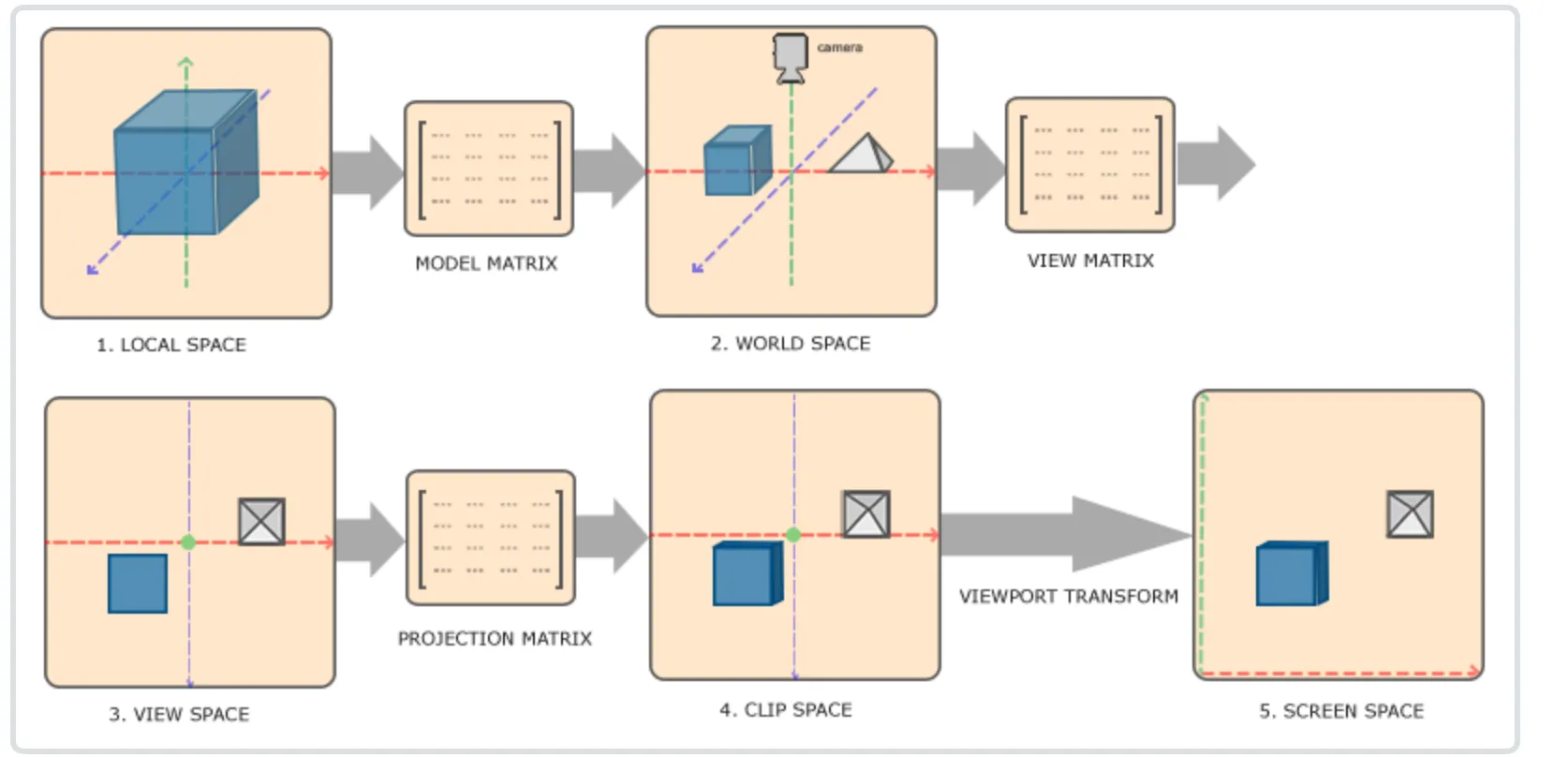
image.png

局部空间到世界空间

这一步非常好理解,局部空间主要是存放模型的顶点,原点:通常是模型的几何中心或某个参考点。 通常会标准化到 [-1, 1] 范围。

Model矩阵的意义就是定义模型在世界空间的尺寸和位姿,在model矩阵中填入模型的rotate,scale和tranlate 组成model矩阵。

局部空间到观察空间

这里涉及的主要知识就是线形代数中的基变换。 本质:向量不变,基向量变了,所以坐标(系数)必须变。

矩阵 P:由新基向量在旧系中的坐标作为列组成。

口诀:

  • \to 旧:直接乘 PPPxnew=xoldP \mathbf{x}_{new} = \mathbf{x}_{old}
  • \to 新:乘逆矩阵 P1P^{-1}xnew=P1xold\mathbf{x}_{new} = P^{-1} \mathbf{x}_{old}

在 OpenGL 或计算机图形学中,从世界坐标(World Space)变换到相机坐标(Camera/View Space) 是“坐标变换”最经典、最实用的例子。

这个变换通常由 视图矩阵(View Matrix) 完成。

我们将利用上一节提到的**“Old \to New 需要逆矩阵”**的理论来一步步推导这个过程。


1. 场景设定与直观理解

设定

  • 旧坐标系(世界坐标):绝对的 (0,0,0)(0,0,0),基向量是标准的 X,Y,ZX, Y, Z
  • 新坐标系(相机坐标):以相机为中心,相机永远觉得自己是在原点 (0,0,0)(0,0,0),看向 Z-Z 轴(OpenGL右手系标准)。
  • 物体:一个茶壶放在世界坐标 (10,5,3)(10, 5, 3) 的位置。
  • 相机:放在世界坐标 (0,5,10)(0, 5, 10) 的位置,看向茶壶。

直观理解:相对运动

在图形学中,移动相机太麻烦了(因为屏幕是死的),所以我们采用**“逆向思维”**:

不移动相机,而是反向移动整个世界。

如果你想把相机向移 5 米,等同于把世界里所有的物体向移 5 米。 这就解释了为什么我们需要计算**“逆(Inverse)”**。


2. 构建相机的“基向量”(UVN系统)

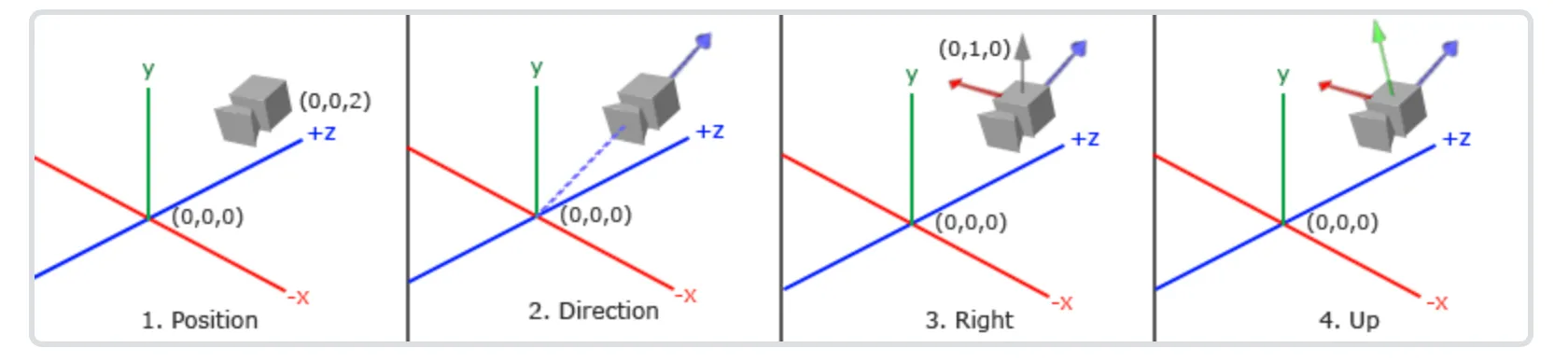
首先,我们需要知道新坐标系(相机)长什么样。通常我们使用 gluLookAt(eye, center, up) 函数来定义:

  1. Eye (相机位置): PeyeP_{eye}
  2. Center (看向哪里): PtargetP_{target}
  3. Up (世界的大致上方): upworld\vec{up}_{world} (通常是 0,1,00,1,0)

提示

定义相机的Position,Target,Up 本质上就是构建新的坐标的基向量,也是构建过渡矩阵

我们需要构建相机的三个正交基向量(Right, Up, Direction):

  1. Z轴(方向轴 f\vec{f}: 在OpenGL中,相机看向 Z-Z 方向,所以 +Z+Z 指向相机的背后。 zcam=normalize(PeyePtarget)\vec{z}_{cam} = \text{normalize}(P_{eye} - P_{target})
  2. X轴(右轴 r\vec{r}: 利用叉乘(Cross Product)。右轴垂直于“上方向”和“Z轴”。 xcam=normalize(upworld×zcam)\vec{x}_{cam} = \text{normalize}(\vec{up}_{world} \times \vec{z}_{cam})
  3. Y轴(上轴 u\vec{u}: 垂直于已经算出来的 Z 和 X。 ycam=zcam×xcam\vec{y}_{cam} = \vec{z}_{cam} \times \vec{x}_{cam}

现在,我们有了新坐标系的基向量:r,u,f\vec{r}, \vec{u}, \vec{f}

这里根据rgb颜色观察相机的x,y,z轴

image.png


3. 矩阵推导:平移与旋转

我们要把一个点 PworldP_{world} 变成 PcameraP_{camera}。 公式是: Pcamera=ViewMatrixPworldP_{camera} = \text{ViewMatrix} \cdot P_{world}

这个变换分为两步:先平移(把相机移回原点),再旋转(把相机的朝向对准坐标轴)。

第一步:平移矩阵 TT

相机当前在 Peye=(xe,ye,ze)P_{eye} = (x_e, y_e, z_e)。 要把相机移回世界原点 (0,0,0)(0,0,0),我们需要平移 (xe,ye,ze)(-x_e, -y_e, -z_e)

T=[100xe010ye001ze0001]T = \begin{bmatrix} 1 & 0 & 0 & -x_e \\ 0 & 1 & 0 & -y_e \\ 0 & 0 & 1 & -z_e \\ 0 & 0 & 0 & 1 \end{bmatrix}

第二步:旋转矩阵 RR(核心应用!)

这里是应用我们之前理论的关键点。

我们知道旋转矩阵 RorientationR_{orientation}应该是新基向量(相机的 r,u,f\vec{r}, \vec{u}, \vec{f})在世界坐标下的值。

Rorientation=[0ruf000001]R_{orientation} = \begin{bmatrix} | & | & | & 0 \\ \vec{r} & \vec{u} & \vec{f} & 0 \\ | & | & | & 0 \\ 0 & 0 & 0 & 1 \end{bmatrix}

但是! 上面这个矩阵代表的是 Camera \to World 的变换(把相机坐标转成世界坐标)。 正如第一部分理论所说:已知旧坐标求新坐标(World \to Camera),需要乘以逆矩阵 P1P^{-1}

线性代数的小魔法: 对于纯旋转矩阵(正交矩阵),逆矩阵等于转置矩阵(Inverse = Transpose)。 所以,我们不需要辛苦算逆,直接把行变成列即可:

R=(Rorientation)1=(Rorientation)T=[r0u0f00001]=[rxryrz0uxuyuz0fxfyfz00001]R = (R_{orientation})^{-1} = (R_{orientation})^{T} = \begin{bmatrix} - & \vec{r} & - & 0 \\ - & \vec{u} & - & 0 \\ - & \vec{f} & - & 0 \\ 0 & 0 & 0 & 1 \end{bmatrix} = \begin{bmatrix} r_x & r_y & r_z & 0 \\ u_x & u_y & u_z & 0 \\ f_x & f_y & f_z & 0 \\ 0 & 0 & 0 & 1 \end{bmatrix}

(注意:这里的基向量现在横着躺在了里)


4. 最终的视图矩阵 (View Matrix)

将两步合起来(先平移,再旋转,注意矩阵乘法顺序是从右向左):

ViewMatrix=RT\text{ViewMatrix} = R \cdot T
ViewMatrix=[rxryrz0uxuyuz0fxfyfz00001][100xe010ye001ze0001]\text{ViewMatrix} = \begin{bmatrix} r_x & r_y & r_z & 0 \\ u_x & u_y & u_z & 0 \\ f_x & f_y & f_z & 0 \\ 0 & 0 & 0 & 1 \end{bmatrix} \cdot \begin{bmatrix} 1 & 0 & 0 & -x_e \\ 0 & 1 & 0 & -y_e \\ 0 & 0 & 1 & -z_e \\ 0 & 0 & 0 & 1 \end{bmatrix}

计算结果就是经典的 LookAt Matrix

[rxryrzrPeyeuxuyuzuPeyefxfyfzfPeye0001]\begin{bmatrix} r_x & r_y & r_z & -\vec{r} \cdot P_{eye} \\ u_x & u_y & u_z & -\vec{u} \cdot P_{eye} \\ f_x & f_y & f_z & -\vec{f} \cdot P_{eye} \\ 0 & 0 & 0 & 1 \end{bmatrix}

(注:最后的一列实际上就是 rPeye-\vec{r} \cdot P_{eye},也就是平移向量在新基向量上的投影)


5. 总结与举例验证

假设:

  • 相机位置(0,0,5)(0, 0, 5)
  • 看向(0,0,0)(0, 0, 0)
  • 上方(0,1,0)(0, 1, 0)
  • 世界中有一个点Pworld=(0,0,2)P_{world} = (0, 0, 2)

人脑直观推测: 相机在 z=5z=5 看向原点,点在 z=2z=2。对相机来说,这个点在它前方 3 米处。因为相机看的是 Z-Z 方向,所以在相机坐标系里,这个点的坐标应该是 (0,0,3)(0, 0, -3)

利用矩阵计算

  1. 基向量

    • f=(0,0,1)\vec{f} = (0,0,1) (指向相机背后)
    • r=(1,0,0)\vec{r} = (1,0,0)
    • u=(0,1,0)\vec{u} = (0,1,0)
  2. 旋转矩阵 RR (转置后还是它自己,因为是对角阵):单位矩阵。

  3. 平移矩阵 TTzz 轴平移 5-5

  4. 运算

    Pcam=[1000010000150001][0021]=[00251]=[0031]P_{cam} = \begin{bmatrix} 1 & 0 & 0 & 0 \\ 0 & 1 & 0 & 0 \\ 0 & 0 & 1 & -5 \\ 0 & 0 & 0 & 1 \end{bmatrix} \begin{bmatrix} 0 \\ 0 \\ 2 \\ 1 \end{bmatrix} = \begin{bmatrix} 0 \\ 0 \\ 2-5 \\ 1 \end{bmatrix} = \begin{bmatrix} 0 \\ 0 \\ -3 \\ 1 \end{bmatrix}

结果吻合!

关键点回顾

在 OpenGL 的这个例子中,体现了坐标变换的两个精髓:

  1. 逆向思维:World \to Camera 本质上是把世界做了一个逆变换T1R1T^{-1} \cdot R^{-1})。
  2. 基变换计算:利用正交矩阵的性质(R1=RTR^{-1} = R^T),将相机的基向量作为填入矩阵,即可完成旋转变换。

3️⃣FPS相机与轨道相机

轨道相机的本质是球坐标系 (Spherical Coordinates) 到 直角坐标系 (Cartesian Coordinates) 的转换。

假设我们盯着点PtargetP_{target},距离为 R,角度为 θ(Pitch) ,我们要算出相机的位置PeyeP_{eye}. 计算公式:

x=Rcos(θ)cos(ϕ)y=Rsin(θ)z=Rcos(θ)sin(ϕ)\begin{aligned} {x} & {{}=R \cdot\operatorname{c o s} ( \theta) \cdot\operatorname{c o s} ( \phi)} \\ {y} & {{}=R \cdot\operatorname{s i n} ( \theta)} \\ {z} & {{}=R \cdot\operatorname{c o s} ( \theta) \cdot\operatorname{s i n} ( \phi)} \\ \end{aligned}

这算出来的是相对于目标点的偏移量 (Offset)。所以,相机的最终位置是:

Peye=Ptarget+[xyz]P_{e y e}=P_{t a r g e t}+\left[ \begin{matrix} {x} \\ {y} \\ {z} \\ \end{matrix} \right]

最直观的感受就是:

  • FPS:输入改变角度,导致你看到的画面在旋转,但物体不动(除非你按W前进)。

  • 轨道:输入改变角度,导致世界在旋转(其实是相机绕到了物体侧面),物体始终在屏幕中心。

计算代码参考:

c++
void Camera::updateViewMatrix() { // 计算相机朝向角度的弧度值以及相关三角函数值 const float yawRad = qDegreesToRadians(m_yaw); const float pitchRad = qDegreesToRadians(m_pitch); const float cosPitch = qCos(pitchRad); // 根据欧拉角计算相机前方方向向量 QVector3D forward( qSin(yawRad) * cosPitch, qSin(pitchRad), qCos(yawRad) * cosPitch ); forward.normalize(); // 根据目标点、前方方向和距离计算相机实际位置 m_position = m_target - forward * m_distance; // 构建视图矩阵 m_viewMatrix.setToIdentity(); m_viewMatrix.lookAt(m_position, m_target, m_up); }

本文作者:James

本文链接:

版权声明:本博客所有文章除特别声明外,均采用 BY-NC-SA 许可协议。转载请注明出处!